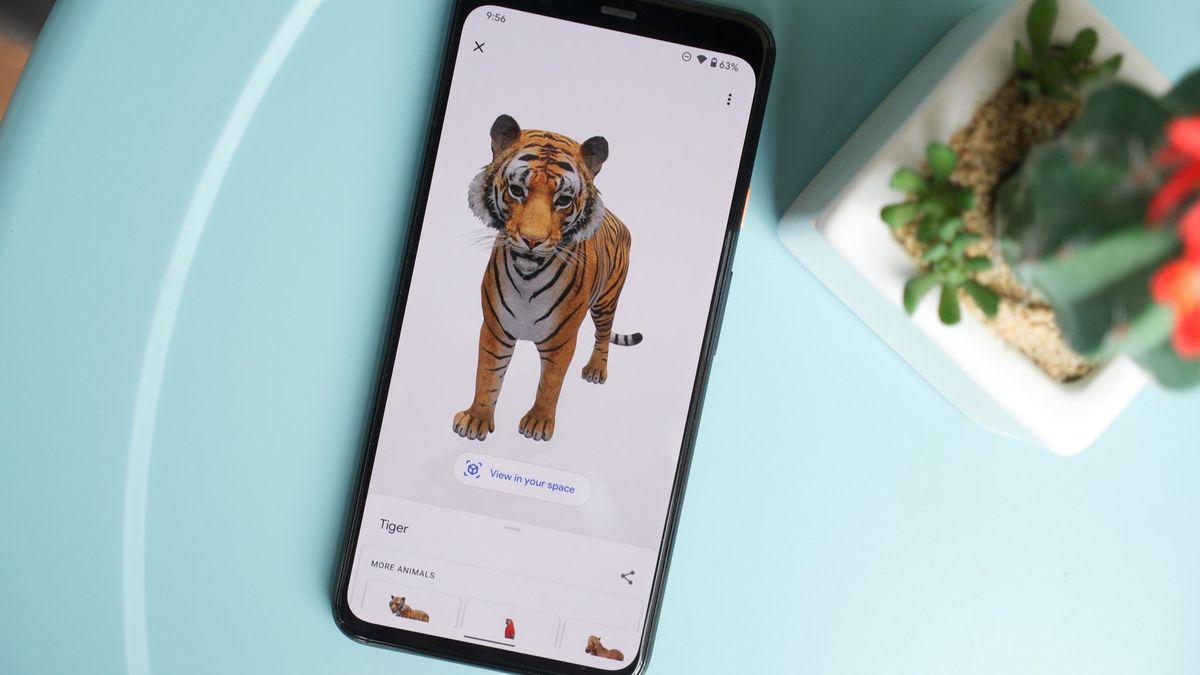
Google 3D animals are an innovative feature that allows users to explore lifelike, interactive representations of various animals directly from their devices. By using augmented reality (AR), Google enables users to bring these creatures into their own environment, providing an immersive experience that enhances learning and engagement. Whether you’re a student, a teacher, or just a curious individual, this tool offers a unique way to observe and understand the anatomy, behavior, and habitat of a wide range of species—all from the comfort of your home. With just a simple search, you can encounter everything from a majestic lion to a playful puppy, making education and exploration accessible and fun for everyone.
What Are Google 3D Animals?
Google 3D animals are lifelike, augmented reality (AR) representations of various species that you can view and interact with in your own environment. Using Google Search, users can search for specific animals and, if available, see a button that says “View in 3D.” Once activated, the AR model can be placed in your surroundings through your device’s camera, allowing you to see these animals in true-to-size dimensions.
How It Works
To experience Google 3D animals, follow these simple steps:
- Search for an Animal: Open Google on your mobile device and type in the name of the animal you want to see (e.g., “tiger,” “dog,” “panda”).
- Access the 3D Model: If the animal is available in 3D, you’ll see a section that says “Meet a life-sized [animal name].” Click on it.
- View in Your Space: Tap “View in 3D,” and your camera will activate. You can move your device around to find the best angle, and you can scale the animal to see it up close or from a distance.
Educational Benefits
The educational potential of Google 3D animals is immense. This feature offers an interactive way for students and wildlife enthusiasts to learn about different species, their sizes, and their habitats. By placing a 3D lion in your living room, for example, you can grasp its scale and appreciate its majesty in a way that a static image simply cannot convey.
Teachers can leverage this tool in classrooms to make lessons more engaging, encouraging students to explore various species, their behaviors, and their ecosystems.
Fun for All Ages
Beyond educational uses, Google 3D animals are a source of fun and creativity. Children and families can enjoy playing with virtual animals, taking pictures, or even filming short videos with them. This interactive play can spark curiosity about wildlife and the importance of conservation.
A Step Towards Conservation Awareness
By making wildlife more accessible, Google helps raise awareness about biodiversity and conservation issues. Users are encouraged to learn about endangered species and the environments they inhabit, fostering a greater appreciation for the natural world.
Limitations and Future Potential
While the feature is impressive, it does have limitations. Not all animals are available in 3D, and the quality of the experience may vary depending on the device used. However, as technology advances, we can expect more animals to be added, along with enhanced graphics and interactivity.
How to find 3D animals on Google
Google’s augmented reality (AR) objects in search are remarkably user-friendly, designed to enhance the learning experience through visual engagement. The underlying philosophy is that the best way to understand a subject is to see it in action. By utilizing AR, users can grasp the scale of an object and observe intricate details that might be overlooked in a standard image.
When searching for a specific topic, such as “tiger,” Google typically presents a Knowledge Panel. These panels, often associated with movies, celebrities, and various subjects, provide an overview of the animal, accompanied by images and a prominent section stating, “Meet a life-sized tiger up close,” along with a “View in 3D” button. Clicking this button immerses users in the AR experience.
In some instances, the 3D model may be located further down the search results page, requiring users to scroll to discover the interactive element. This flexibility in placement allows Google to tailor the AR experience based on the context of the search.
What you need to ‘view in your space’ AR objects on Google
Google’s 3D animals vary depending on the device being used. Generally, AR or 3D objects are not available on desktop computers or laptops; instead, a supported smartphone is required to utilize the “view in space” feature.
The good news is that most modern smartphones meet these requirements. To view AR objects in Google Search, you’ll need:
- Android devices: Android 7.0 or higher with the pre-installed Google Play Store
- iPhones/iPads: iOS 11.0 or higher
This includes a wide range of popular smartphones, such as those from Samsung Galaxy, Google Pixel, Motorola, and more. Almost all iPhones and iPads are compatible as well.
To access the “view in space” option, simply tap the “view in 3D” button. If your device is supported, you’ll see a “view in your space” button appear beneath the 3D animal model, allowing you to immerse yourself in the experience.
You can easily resize the 3D animals by pinching on your screen, allowing you to adjust their size to better fit your environment.
If you’re uncertain whether Google’s 3D animals and other AR objects will work on your device, feel free to give it a try!
Troubleshooting Google’s ‘View in 3D’ AR Objects
If you encounter issues with the AR feature, here are some steps to resolve the problem:
- Check Device Compatibility: Ensure your device meets the minimum requirements (Android 7.0 or higher, or iOS 11.0 or higher).
- Update Your Device: Make sure your operating system and Google Search app are up to date.
- Clear Cache: Clear the cache of your browser or the Google app to eliminate any potential glitches.
- Restart Your Device: Sometimes, a simple restart can resolve functionality issues.
- Check Your Internet Connection: Ensure you have a stable internet connection, as AR features require data to function properly.
If the problem persists, consider checking Google’s support resources for further assistance.
List: 3D animals available on Google Search
As of Now, Google has significantly reduced the list of 3D animals available in Search. Currently, users can view the following supported animals:
3D Animals:
- Goats: Alpine Goat
- Reptiles: Ball Python
- Insects:
- Bumblebee (Moss Carder Bee)
- Stag Beetle
- Brown Cicada
- Ladybug
- Rosailia Batesi
- Swallowtail Butterfly
- Morpho Butterfly
- Hornet (Asian Giant)
- Birds: Kookaburra, Macaw
- Cats:
- Bengal Cat
- Maine Coon
- Norwegian Forest Cat
- Ragdoll
- Scottish Fold
- Siamese Cat
- Dogs:
- French Bulldog
- Pug
- Shiba Inu
- Other Animals:
- Donkey
- Dragon
- Easter Bunny
- Great White Shark
- Hamster
- Tiger
- Quokka
- Unicorn
This is a significant reduction from the original list, which featured over 100 3D animals.
3D Animals that have been removed from Google
Google reached its peak with over 100 3D animals, including a wide variety of cat and dog breeds. However, many of these have been removed from Search.
3D Animals No Longer Available:
General Animals:
- Alligator
- Angler Fish
- Arctic Fox
- Brown Bear
- Cat
- Black Cat
- Persian Cat
- Russian Blue
- Shorthair Cat
- Sphynx Cat
- Kitten
- Coyote
- Cheetah
- Chipmunk
- Deer
- Duck
- Eagle
- Emperor Penguin
- Echidna
- Emu
- Fennec Fox
- Giraffe
- Giant Panda
- Guinea Pig
- Harbour Porpoise
- Hedgehog
- Hippo
- Horse
- Kangaroo
- Koala
- Leopard
- Lion
- Lynx
- Milk Cow
- Moss Carder Bee
- Octopus
- Ox
- Pig
- Platypus
- Raccoon
- Red Panda
- Shetland Pony
- Snake
- Turtle
- White-backed Woodpecker
- Wombat
- Wolf
- Zebra
Dog Breeds Removed:
- Akita
- Australian Shepherd
- Beagle
- Border Collie
- Bull Terrier
- Cane Corso
- Chihuahua
- Chow Chow
- Cocker Spaniel
- Dachshund
- Doberman
- English Bulldog
- German Shepherd
- Golden Retriever
- Great Dane
- Pit Bull
- Pomeranian
- Korean Jindo
- Labrador Retriever
- Maltese
- Poodle
- Rottweiler
- Shih Tzu
- Siberian Husky
- Welsh Corgi
- Yorkshire Terrier
Additionally, various dinosaur models were once supported but have since been removed:
Dinosaurs No Longer Available:
- Tyrannosaurus Rex
- Velociraptor
- Triceratops
- Spinosaurus
- Stegosaurus
- Brachiosaurus
- Ankylosaurus
- Dilophosaurus
- Pteranodon
- Parasaurolophus
This reduction highlights a significant shift from the original offering of 3D animals.
Google previously offered a wide range of 3D insect models, but now only a few are supported. Here’s a list of insects that have been removed from Search:
Insects No Longer Available:
- Rhinoceros Beetle
- Hercules Beetle
- Atlas Beetle
- Miyama Stag Beetle
- Shining Ball Scarab Beetle
- Jewel Beetle
- Firefly
- Robust Cicada
- Periodical Cicada
- Walker’s Cicada
- Evening Cicada
- Mantis
- Grasshopper
- Giant Stag
- Atlas Moth
This reflects a significant reduction from the original selection of insect models.
Google also removed most of its 3D objects and models
Google once provided 3D models of a diverse range of objects beyond just animals and insects, including NASA artifacts, planets, moons, and global landmarks. However, virtually all of these have been removed from Search. Here’s a summary of the objects that were previously available:
NASA Objects:
- Neil Armstrong
- Apollo 11 Command Module
Planets:
- Mercury
- Venus
- Earth
- Mars
- Jupiter
- Saturn
- Uranus
- Neptune
- Pluto
Moons:
- Moon (Earth)
- Phobos (Mars)
- Deimos (Mars)
- Europa (Jupiter)
- Callisto (Jupiter)
- Ganymede (Jupiter)
- Titan (Saturn)
- Mimas (Saturn)
- Tethys (Saturn)
- Iapetus (Saturn)
- Hyperion (Saturn)
- Umbriel (Uranus)
- Titania (Uranus)
- Oberon (Uranus)
- Ariel (Uranus)
- Triton (Neptune)
Locations and Landmarks:
- Abbaye du Mont-Saint-Michel
- Alcatraz Island
- Alhambra
- Amazon Theatre
- Arc de Triomphe
- Aztec Stadium
- Basilica of Our Lady of Guadalupe
- Big Ben
- Brooklyn Bridge
- Buckingham Palace
- Eiffel Tower
- Empire State Building
- Golden Gate Bridge
- Louvre Museum
- Mount Rushmore National Memorial
- Palace of Versailles
- Statue of Liberty National Monument
- Trevi Fountain
- Westminster Abbey
This list reflects just a portion of the many objects that were once accessible in Google’s 3D model offerings, illustrating the breadth of content that has since been eliminated.
3D educational models still available in Google Search
Google has removed several 3D models from Search, including Halloween-themed items, a pair of outdated New Balance shoes, and a significant list of car models. In 2020, Google announced the introduction of over 250 car and truck models for viewing in 3D, but many of these have since been removed. These car models were notable for their high-quality streaming visuals.
Halloween Models:
- Jack-O-Lantern
- Dancing Skeleton
Shoes:
- New Balance FuelCell Echo
Cars and Trucks:
- Audi Q8
- Chevrolet Corvette
- Ford Explorer
- Hyundai Kona
- Nissan Rogue
- Porsche 911
- Porsche Cayenne
- Subaru Outback
- Toyota Prius
- Toyota RAV4
- Volvo XC90
- Volvo S60
Additionally, a large number of 3D models featuring Japanese characters have been taken down, including:
- Ultraman
- Ultraman Zero
- Ultraman Belial
- Gomorra
- Evangelion
- Xi Gundam
- Gundam Penelope
- Gundam Odysseus
- Kogimyun
- Hello Kitty
- Pompompurin
- Little Twin Stars
However, two models remain available:
- Taiko no Tatsujin
- Pac-Man
Google announced an expansion of its 3D models to include educational content focusing on human anatomical systems and cellular structures. Many of these valuable models are still available, thanks to their collaboration with Biodigital and Visual Body. Here are the supported human anatomical systems:
Human Anatomical Systems:
- Human digestive system
- Respiratory system
- Endocrine system
- Female reproductive system
- Nervous system
- Lymphatic system
- Male reproductive system
- Integumentary system
- Excretory system
- Peripheral nervous system
- Urinary system
- Skeletal system
- Muscular system
- Circulatory system
Here are the various parts of the cell that are supported in Google’s 3D models:
Parts of the Cell:
- Mitochondrion
- Prokaryote
- Endoplasmic reticulum
- Bacterium
- Eukaryote
- Plant cell
- Rough endoplasmic reticulum
- Nucleolus
- Flagellum
- Cell membrane
- Animal cell
- Golgi apparatus
- Ribosomes
- Smooth endoplasmic reticulum
- Chromatin
- Nuclear membrane
- Fimbria
- Bacterial capsule
- Plasmids
- Central vacuole
- Cristae
- Plasma membrane
- Cell wall
- Cisternae
Here are some of the chemistry models available in Google’s 3D offerings:
Chemistry Models:
- Functional group
- Organic chemistry
- Methyl acetate
- Propanol
- Salicylic acid
- 1-bromobutane
- Hydrocarbon
- Alkane
- Electrolyte
- Ionic bonding
- Covalent bond
- Chemical bond
- Metallic bonding
- Chemical compound
- Ethene
- Orbital hybridization
- Quantum mechanical model
- Monocotyledon
- Dicotyledon
- Eukaryotic chromosome structure
- Monocyte
- Neutrophil
- Basophil
- Eosinophil
- Solenoid
However, some of these models may not appear prominently in search results compared to 3D animals, and there are times when they may not show up at all. For instance, planetary models tend to appear more reliably when the search query includes “in depth.”
Additionally, Google has removed a number of 3D models of human body parts that were previously supported. The following models are no longer available:
- Appendix
- Brain
- Coccyx
- Cranial Nerve
- Ear
- Eye
- Foot
- Hair
- Hand
- Heart
- Lung
- Mouth
- Muscle Flexion
- Neck
- Nose
- Ovary
- Pelvis
- Platelet
- Red Blood Cell
- Rib
- Shoulder
- Small Intestine
- Large Intestine
- Stomach
- Synapse
- Testicle
- Thoracic Diaphragm
- Tongue
- Trachea
- Vertebra
The reasons behind Google’s removal of many 3D and AR objects remain unclear, especially considering how valuable they were for educational purposes during COVID-19 lockdowns and continue to be for learning.
Frequently Asked Questions
What are Google 3D animals?
Google 3D animals are augmented reality (AR) models of various animals that you can view in your own space using a smartphone or tablet. They provide an interactive way to learn about different species.
How do I access Google 3D animals?
You can access them by searching for a specific animal on Google. If the 3D model is available, a “View in 3D” option will appear in the search results.
What devices are compatible?
Most modern smartphones and tablets with AR capabilities support Google 3D animals. Ensure your device has a compatible version of ARCore (Android) or ARKit (iOS).
How do I view a 3D animal?
- Search for the animal (e.g., “tiger”).
- Tap on the “View in 3D” option.
- Follow the prompts to place the animal in your environment.
Can I take pictures with 3D animals?
Yes! Once the animal is in your space, you can take photos or record videos with it using your device’s camera.
Are there many animals available?
Google offers a variety of animals, including common pets, wild animals, and some dinosaurs. The selection may vary by region.
Do I need an internet connection?
Yes, an internet connection is required to download the 3D models and access the AR features.
Is it free to use?
Yes, using Google 3D animals is completely free.
Can I view them on a computer?
Currently, Google 3D animals are primarily designed for mobile devices, so viewing them on a computer isn’t supported.
What if I have trouble using it?
If you encounter issues, ensure your device is updated, AR features are enabled, and that you are using a supported browser or app. Restarting your device may also help.
Conclusion
Google’s 3D animals have become a popular educational tool, offering interactive and engaging ways for users to learn about various species. These models provide a lifelike experience that enhances understanding of animal anatomy, behavior, and habitats. Despite recent removals of some models, including a variety of educational content, the remaining 3D animals continue to serve as a valuable resource for students, educators, and curious individuals alike. As Google refines its offerings, the impact of these models on learning and exploration remains significant, demonstrating the potential of augmented reality in enhancing educational experiences.
